Pag-IBIG Contributions in 2026: Rates, Ceiling, and How to Compute
What Pag-IBIG is and why it belongs on every payslip
The Home Development Mutual Fund (HDMF), better known as Pag-IBIG, is one of the three mandatory government contributions Philippine employers deduct every payday, alongside SSS and PhilHealth. It funds affordable housing loans, short-term cash loans, and a savings program that earns dividends for members, so the peso you deduct is not a tax that disappears. It goes into an account your employee can eventually borrow against or withdraw.
For small-business owners and HR teams, the good news is that Pag-IBIG is the simplest of the three to compute. There are only two contribution rates and one compensation ceiling to remember. The catch is that the details changed in recent years, and using outdated figures is a common reason employers under-remit and face penalties. This guide walks through the exact 2026 rates, the PHP 10,000 ceiling, and how to compute both the employee and employer share with real peso examples.
Coverage is broad. Any employee who is also a member of SSS is generally required to be a Pag-IBIG member as well, which in practice means almost every private-sector worker on your payroll. Household helpers, self-employed individuals, and overseas Filipino workers are covered too, though this guide focuses on the employer-employee setup that most Philippine businesses deal with each payday. Once you understand the two rates and the single ceiling, the rest is arithmetic you can do in seconds, or let your payroll system handle for you.
Pag-IBIG rates and ceiling for 2026
Pag-IBIG contributions are a percentage of monthly compensation, and the rate depends on how much the employee earns:
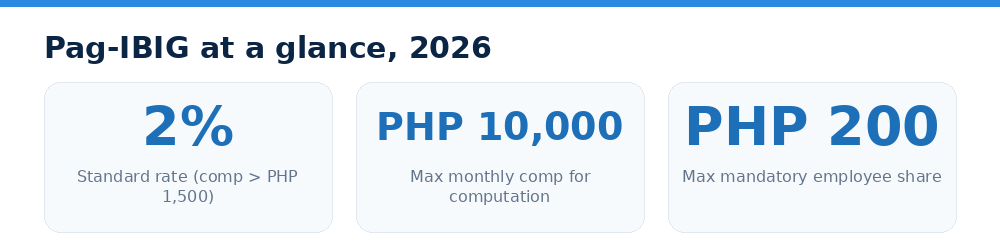
- 1% of monthly compensation if the employee earns PHP 1,500 or less per month.
- 2% of monthly compensation if the employee earns more than PHP 1,500 per month.
The employer share is a flat 2% of the employee's monthly compensation, regardless of the salary bracket. This means a low earner effectively gets a bigger relative boost from the employer.
The single most important number to remember is the maximum monthly compensation of PHP 10,000 used for the computation. This ceiling was raised from PHP 5,000 back in February 2024 and remains in force for 2026. Because of it, the maximum mandatory employee share is PHP 200 per month (2% of PHP 10,000), and the employer matches that with PHP 200. Any salary above PHP 10,000 is simply ignored for the mandatory computation. Members who want to build their savings faster may still contribute more on a voluntary basis.
Put together, the mandatory framework has just three moving parts: the rate (1% or 2%), the flat 2% employer counterpart, and the PHP 10,000 ceiling. Compare that with SSS, which uses a bracketed monthly salary credit, or PhilHealth, which has both an income floor and ceiling, and you can see why Pag-IBIG rarely trips up payroll staff once the current figures are locked in. The trouble almost always comes from stale numbers, so make sure your team knows the PHP 5,000-to-PHP 10,000 ceiling change is already in effect.
How to compute the employee share, step by step
Computing Pag-IBIG takes three quick steps. First, cap the monthly compensation at PHP 10,000. If the employee earns more than that, you only use PHP 10,000 in your math. Second, pick the rate: 1% if actual compensation is PHP 1,500 or below, otherwise 2%. Third, multiply the capped compensation by the rate.
Here are three worked examples:
- Employee earning PHP 1,200/month: compensation is at or below PHP 1,500, so the rate is 1%. Share = PHP 1,200 x 1% = PHP 12. The employer still pays 2% = PHP 24.
- Employee earning PHP 8,000/month: rate is 2%. Share = PHP 8,000 x 2% = PHP 160. Employer share = PHP 160.
- Employee earning PHP 25,000/month: compensation is capped at PHP 10,000. Share = PHP 10,000 x 2% = PHP 200, the maximum. Employer also pays PHP 200.
Notice that once an employee's salary passes PHP 10,000, the contribution stops growing. A worker earning PHP 12,000 and one earning PHP 120,000 pay the same PHP 200 mandatory share.
Employee vs employer share at sample salaries
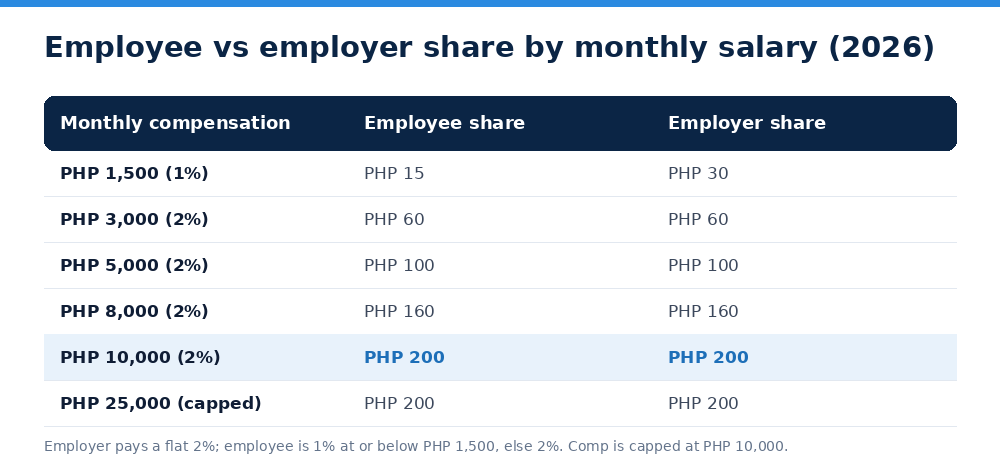
Because the employee rate can be 1% or 2% while the employer is always 2%, the two shares are not always equal. At the very low end the employer actually contributes more than the employee. The table that follows this section lays out both shares side by side at common salary points, and you can see the total contribution reach its ceiling of PHP 400 per month (PHP 200 + PHP 200) once compensation hits PHP 10,000.
Keep in mind that "monthly compensation" for Pag-IBIG generally refers to basic pay. Company policy and specific pay structures can vary, so when an edge case comes up, it is worth confirming the treatment with Pag-IBIG directly rather than guessing.
The table also makes the fairness of the low-income rate obvious. A worker earning exactly PHP 1,500 pays only PHP 15, while the employer still puts in PHP 30, so the employee walks away with a 2-to-1 boost on their savings. As soon as compensation crosses PHP 1,500, both sides pay 2% and the shares match, all the way up to the PHP 10,000 ceiling where each side tops out at PHP 200. Once you have run these numbers a few times, the pattern is easy to eyeball, and any decent payroll tool will apply the right rate automatically based on each employee's salary.
Voluntary top-ups and the MP2 savings program
The PHP 200 cap only limits the mandatory contribution. Employees who want a larger housing-loan capacity or bigger dividends can voluntarily contribute above 2%, and employers may agree to match a portion, though matching above the mandatory amount is optional. Many members also enroll in the Pag-IBIG MP2 (Modified Pag-IBIG II) savings program, a separate voluntary account with a 5-year term that historically pays higher, tax-free dividends than the regular fund.
For payroll purposes, the key distinction is simple: the mandatory 1% or 2% (capped at PHP 200) is what you must deduct and remit for every covered employee. Anything extra is a voluntary arrangement you set up per employee. Mandatory Pag-IBIG contributions, like SSS and PhilHealth, are also non-taxable, so they are deducted before you compute withholding tax. That keeps your employees' take-home pay a little healthier.
Remittance, deadlines, and staying compliant
Deducting the contribution is only half the job. As the employer, you collect the employee share, add your own, and remit the total to Pag-IBIG. Remittance schedules are assigned based on the first letter of the employer's name, and most employers pay monthly, so confirm your due date on the Pag-IBIG Virtual Pag-IBIG portal or your payment channel to avoid penalties for late payment.
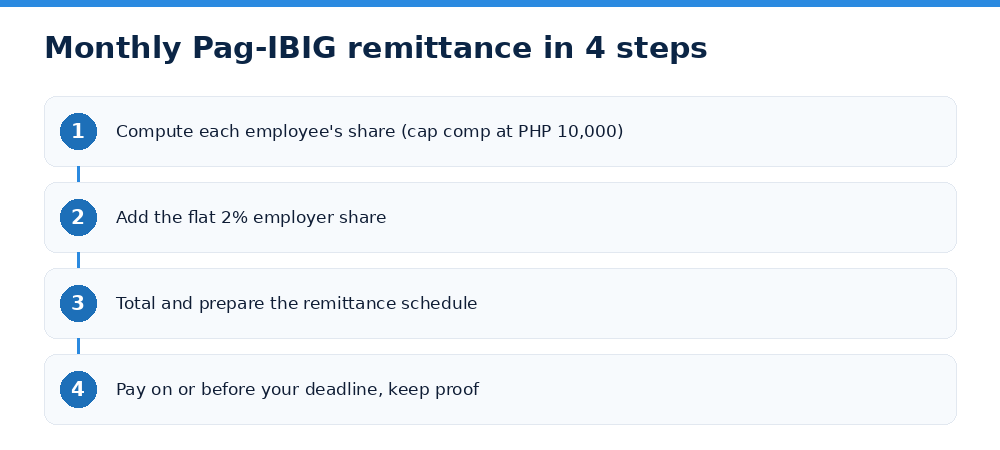
A clean process looks like this: compute each employee's share correctly, match it, prepare the remittance schedule with the correct amounts, pay on or before your deadline, and keep proof of payment. Errors usually creep in from three places: forgetting the PHP 10,000 cap, applying 1% to someone who should be at 2%, or missing the deadline. Getting these right every month keeps your records audit-ready.
If you would rather not track rates, caps, and cut-off dates by hand, Sahodly computes Pag-IBIG, SSS, PhilHealth, and withholding tax automatically for every payslip and flags remittance totals for you. You can try Sahodly free and let the software handle the math while you focus on the business. Rates here are current as of 2026; Sahodly is not official government software, so verify edge cases with Pag-IBIG.